Showing posts with label Windows. Show all posts

Sunday, 1 September 2013

How To Activate Windows 7 with Command Prompt (CMD)


First of all Open your Command Prompt (Cmd) as an Administrator.To Open it as an Administrator GO to Start-menu and Type cmd then Right Click on the Cmd and click on Run as Administrator as Shown below in the Image.
computerknowledgefree.blogspot.com


Now Type the Command SLMGR -REARM in cmd as Shown below in the Image
Press Enter and Wait For Few Seconds
computerknowledgefree.blogspot.com

AMessage Dialog Box Will open Specifying Command ‘ Completed Successfully.‘ as Shown below in the Image
computerknowledgefree.blogspot.com

Restart Your Computer and done.Now You are Free of the Error ‘Windows 7 is Not Genuine’

Important Note - You Must Run Command Prompt as an Administrator Else this Method Will Not Work

http://www.erecsys.com/

Genuine Activators For Windows Xp, vista, 7, 8 full Free Download


Your All Windows is "permanent activated"

Supported Version

Windows Xp All Versions 

> Windows XP Starter Edition, 
> Windows XP Home Edition, 
> Windows XP Home Edition N, 
> Windows XP Professional, 
> Windows XP Professional N, 
> Windows XP Tablet PC Edition, 
> Windows XP Media Center Edition 
> Windows XP Media Center Edition 2003
> Windows XP Media Center Edition 2004
> Windows XP Media Center Edition 2005
> Windows XP 64-bit Edition – 

 Windows vista All Versions

> Windows Vista Starter 
> Windows Vista Home Basic 
> Windows Vista Home Premium 
> Windows Vista Business
> Windows Vista Enterprise
> Windows Vista Ultimate 

Windows 7 

> Windows 7 Ultimate E
> Windows 7 Professional
> Windows 7 Professional E
> Windows 7 Home Premium
> Windows 7 Home Premium E
> Windows 7 Home Basic
> Windows 7 Starter
> Windows 7 Starter E
> Windows Vista Ultimate
> Windows Vista Business
> Windows Vista Business N
> Windows Vista Home Premium
> Windows Vista Home Basic
> Windows Vista Home Basic N
> Windows Vista Starter
> Windows Server 2008 R2: Enterprise
> Windows Server 2008 R2: Standard
> Windows Server 2008 R2: Foundation
> Windows Server 2008: Enterprise
> Windows Server 2008: Standard
> Windows Server 2008: Foundation
> Windows Small Business Server 2008
> Windows Small Business Server 2011 
> Important Note 1: You must be running build 7600 or greater for Windows 7 and 
Windows Server 2008 R2.
> Important Note 2: I do not recommend using any of the Windows 7 E editions.
> Important Note 3: Windows 7 N editions will only be supported when OEM SLP 
serials leak.

Windows 8

> Windows 8 Professional
> Windows 8 Enterprise
> Windows 8 Core
> Windows 8 Personalization Enabler


Genuine Activators For Windows Xp, vista, 7, 8

http://www.erecsys.com/

Friday, 23 August 2013

How to Create Windows 8 Bootable USB Drive.+USB Installer Maker

Windows 8 USB Installer Maker is a utility written for Windows 7 (not tested on other Windows versions), it will help you build a Windows 8 installer using your USB pendrive and the DVD ISO image.

This tool allows you to create a copy of your Windows 8 ISO file on a USB flash drive. Just download the ISO file & then Run the Windows 8 USB Installer Maker tool. After this, you can install Windows 8 directly from the USB flash drive.

Requirements:

- Windows 7 x86/x64
- USB Pen drive at least a 4GB
- Windows 8 DVD ISO image
Download Windows 8 USB Installer Maker below link.

How to use:

  • Start Win8USB.exe ( you need administrative privileges since it needs elevated access to your usb drive )1. Connect your USB drive and make sure it is recognized correctly by your Windows machine
  • Select your USB drive & make sure it has a NTFS filesystem format & at least 4GB of capacity.
  • Search for the ISO file.
  • Once located the ISO image file, check Format drive (this is mandatory if you have free space less than required and also if you do not have a NTFS formatted USB drive, perhaps is FAT32, so check this, this is recommended, and do not forget that it will destroy any file found in that USB drive)
  • Finally click Create button & wait patiently, very patiently.
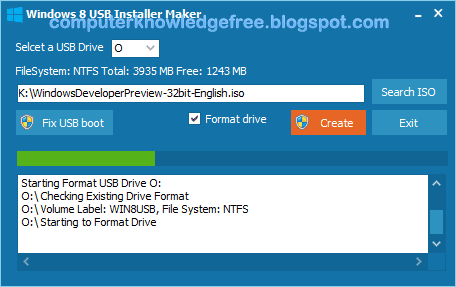
At this point the tool is formatting your pendrive

Now it started unpacking all the installation files to your USB drive and according to your USB drive speed it will take its time, notice that it shows the utility as hung and unresponsive, it is normal, just make sure that your pendrive is in activity, because all files should be copying in background.


  • Finally you will see in the log text that it has written the boot entry to you USB (now your USB drive is bootable)
Make sure it says “Successfully updated NTFS file system boot code. else click the Fix USB boot button
  • Now it only lefts to restart your PC, modify your BIOS boot device (choose your USB drive making sure it has been plugged in before entering the BIOS).

 Windows 8 USB Installer Maker

Thursday, 22 August 2013

Any Video Converter Professional 2013 (v5.0.8) Final+crack Free Download

computerknowledgefree.blogspot.com

Any Video Converter Professional 2013 (v5.0.8) Final+crack

Any Video Converter converts the video from one format to another. 1 of the most  wanted & most downloaded video and audio converter which converts the video for Android, iPhone's, Mobile Phones etc. Any Video Converter is All-in-One video converter with the easy & user friendly Graphical User Interface. Format Supported:  WMV, MKV, FLV, SWF, 3GP, DVD, AVI, MP4, WebM, Andonis, MP3, iPad, Tablet PC.

OS: Windows 2000, Windows XP, Vista Windows, Windows 7 and Windows 8.
So, download the Any Video Converter Professional 2013 (v5.0.8) Final.

How to install:

Step 1: unpack rar archive
Step 2: run the setup
Step 3: Copy avcdrm.DLL file from crack folder & paste it to the software installed directory.
Step 4: Enjoy......

Any Video Converter Professional 2013 (v5.0.8) Final+crack Free